
SX10500: Connecting to your controller
The board can connect to your controller in one of two ways: Via Xwire or via RS485. You have to decide which interface you are using, select it via a jumper and then connect to the corresponding external terminals.
Xwire is our proprietary serial peripheral bus. It consists of the Xwire electrical interface and the Xwire data protocol (language) that is used to convey data across the interface and wiring. The Xwire electrical interface is good for a few feet and up to 10 boards.
RS485 is an industry standard electrical interface suitable for direct wire connection between devices located up to hundreds of feet apart. RS485 does not specify a protocol. When you use RS485 with this board it will use the Xwire protocol with up to 32 boards. The programming is the exact same but you will be able to go further for the cost of an extra RS485/Xwire converter on the controller.
Selecting the Xwire or RS485 interface
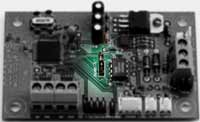
A 3-pin jumper in the middle of the board is labelled RS485 X. Inserting a jumper in the two pins closest to the camera will activate the RS485 interface. Inserting the jumper in the two pins furthest from the camera activates the Xwire electrical interface. The jumper must be correctly set or the board will not work as expected.
Connecting to the Xwire interface
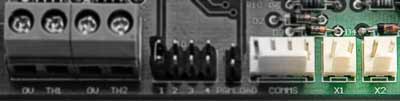
Two connectors on one long side of the board are labelled X1 and X2. These are the Xwire electrical connections. The two connectors are wired in parallel on the board to facilitate daisychaining, and are completely interchangeable. The lefthand pin of each connector is ground (0V). If you are wiring to other boards with X1/X2 connectors, simply wire like pins together. If wiring to MMi202 or SL100, see the Xwire connection instructions in their documentation. See also wiring in the Xwire documentation.
Connecting to the RS485 interface
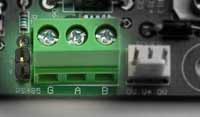
The 3-pin screw terminal block is for RS485 connection. The A and B terminals should go to A and B on all other devices on the RS485 system. The G terminal should go to system ground. Just next to the terminals (to the left above) is a jumper marked "Term". Installing a jumper in that position provides an RS485 line terminator.
Xwire operates at 38.4KB, which is slow for RS485. The connection is "two wire, half duplex".