In the program in the previous section each of the two subroutines is acting as a more or less autonomous program, taking care of some aspect of the overall functionality of the program. While the example may be trivial, the concept is a very powerful one.
From now on I am going to refer to them as "Tasks" or "Processes" or "Objects".
These ideas about tasks, processes and objects are simply a way of viewing things. There is nothing to say you must program SPLat this way. It just happens to be the way I have found works best for a wide range of complex control applications.
The idea behind the terms task and process are that the overall control function you need to implement can be broken down into identifiable entities, each taking care of some aspect of the overall control.
I like coffee. Real coffee. Serious coffee. My kind of coffee comes out of an espresso machine, thick and black, in small cups. My idea of heaven would be (well, include) one of those espresso machines that automatically grinds the coffee and makes a fresh cup of Good Brew at the press of a button.
If I could build such a machine (my mechanical skills are really not up to it!), it would need at least the following parts:
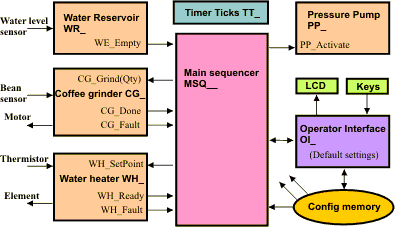
The controller for all this will be quite complex. One way to manage that complexity is "divide and conquer". For each functional element of the machine define a corresponding program element that takes care of it. This is what we call a task or a process. You can then arrange the tasks into a block diagram, like the one shown here.
The block diagram shows the commands and/or data that must flow between blocks. I have planned a central coordinating task, called the main sequencer. Its job is to orchestrate the whole thing. (I don't intend to fully develop this example, it is far too complicated for that. But it will serve as a vehicle to introduce several interesting concepts).
The arrows between tasks in this diagram represents an exchange of data and/or commands. For example, the main sequencer can command the grinder to grind a batch of coffee, specifying the quantity. The grinder in turn reports back with a "Done" signal or a "Fault" signal. The mechanisms for these command and data exchanges will be developed later.
Take a look at the Pressure Pump box. I have planned for an "input" to it to activate the pump, but there's no feedback from it to say the pumping has worked, or is working, or has failed. Does that mean I've overlooked something? In all probability, yes it does. The top level block diagram is a tool you use to work out what main tasks your program will contain, and how they will interact. Thus you would draw a box, call it pressure pump and then ask yourself "What command inputs does this thing need? What answers must it provide? What can go wrong? How will it detect and report problems?". A far as possible, think about the pressure pump as an isolated subsystem and formulate the rules that your program will need to apply to correctly manage the pump.
Have you noticed that we have gradually moved from the idea of a simple subroutine, to one a couple of screens ago that has two entry points, one for initialization and one for normal updates? I am now sneaking in ones with entry points (inputs?) and outputs. We have gone beyond simple subroutines and started using the term "tasks" or "processes". I am now going to introduce a further development of this concept, and call them objects.