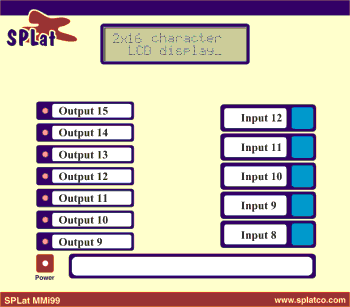
The MMi203 is named for its built in operator interface (Man-Machine interface). The operator interface consists of:
These are miniature momentary action push buttons, wired to dedicated inputs. They are sensed by a program just like any other input, though the SPLat programming language contains special instructions that are designed to simplify programming user interface operations.
These are program-controlled front panel indicators. They are programmed like any other output. There is one pair of instructions for making it extremely easy to make them blink (flash).
Allows audible alerts and alarms
This is a flexible plastic sheet that covers the front panel. It contains the labels and marking required to inform your user about what the various controls are for. If you have your own made you can also include your own company logo.
The LCD extends the capability of the operator interface, allowing you to create numeric and message displays and user-friendly menus.
In the adjacent picture the push buttons and LEDs have been labeled with their input (buttons) and output (LEDs) numbers.
Note: MMi99 Firmware versions prior to 3.13 contained a bug that leads to the order of the front panel LEDs being reversed, relative to the illustration, in some board revisions.