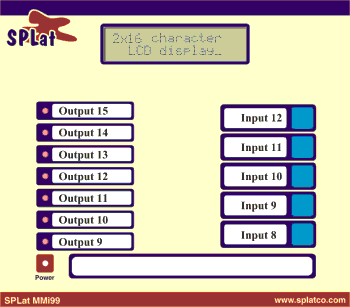
Whenever the program is down loaded to the board, the non volatile memory or permstore memory is erased, and this is where the calibration and setting are held. The program checks for valid contents of permstore memory on power up and will load some default values if the permstore memory has been erased. If this occurs, the display will read: "Default Values Loaded" and the operating parameters will be loaded with the following defaults:
In addition, the calibration values for the pH probe will be loaded with some values that will at least give an approximate reading on the pH display.
There after, the display will start with the normal status screen:
"pH= 7.01 T= 77.0"
"Filt:0 USER "
This screen shows that the measured pH is 7.01 (in this case) the compensation temperature is 77°F, the pH filter is set to zero (filter is off) and the temperature compensation source is USER, which means that the temperature value is being supplied by the user via the front panel push buttons on the MMi202.
None of the front panel LEDs are used. Some of the front panel push buttons have a dual function depending on which mode the program is operating in. There are three modes:
In Run mode the buttons have the following functions:
If the temperature compensation source has been set to USER (by editing the parameter in the menu mode), then Input 12 and Input 11 increment and decrement respectively the compensation temperature, and the LCD screen value will be updated in real time.
Input 8 sets the software into one of two modes depending on how long the button is pressed for. If it is pressed for less than 6 seconds (short press), the parameter-editing mode (menu mode) is entered. If the button is pressed for 6 seconds or longer (long press), the unit enters the calibration mode. Once calibration mode has been chosen, the only way to abort it is to remove power from the unit. Progressing through the calibration mode without following the calibration procedure and using the correct buffer solutions will render the pH readings useless, hence the 6 second push to enter this mode. Calibration can always be repeated to restore the unit to correct operation.
In Menu mode, operating parameters can be changed:
In Menu mode the front panel buttons have the following function: