By now you should have a program running in SPLat/PC that is merrily flashing a light and at the same time, and quite independently, toggling another light on and off each time you press a button. You will have (should have!) studied how the Suspend/Resume mechanism works, and be able to see how such a simple idea can allow 2, 3 or more tasks to run quite independently and asynchronously.
But what if we need to have the tasks interact? Suppose we want to make it so the flashing light is only active while the other light is off?
There are many ways of achieving this, some better than others. The way I will show you is a "good" way, trust me!
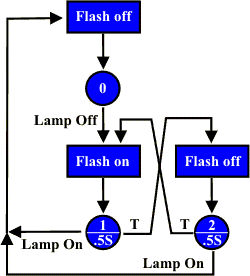
Firstly, I will obviously need to re-write the flasher task to take into account the state of the on/off light. In fact, it will now become a full-blown SPLatMap based state machine, with Suspend/Resume instructions.
The SPLatMap shows the logic of the revised flasher. It starts in state 0, the initialize state. I have called the flashing light "flash" and the other one "lamp", to try and avoid confusion in the diagram. Assuming the flasher task can somehow discover the condition of the lamp, it will flash its output only while the lamp is off.
So how does the flasher find out about the condition of the lamp? It asks the on/off lamp switch task (OOS_)!
What I will do is create a "Property" (attribute) of the OOS_ task that tells me if the lamp is on (true) or off (false). I will call this property OOS_LampOn. The flasher (or any other task in my program) can get OOS_LampOn property by calling the "property get" subroutine OOS_GET_LampOn. It will then be the responsibility of the OOS_ task to return the correct value in the X register.
How do I implement the property and the property get? There are several ways. What is really interesting is that it doesn't matter to the flasher how it is done, just as long as a call to OOS_GET_LampOn returns the correct value. The method I will use is to have OOS_ maintain a semaphore that tracks the condition of the lamp. All OOS_GET_LampOn then has to do is grab the semaphore and return it.
In the new program below you will notice the following changes (I have flagged them with a row of <<<) compared to the previous version:
Here is the complete program.
*****************************************
; I/O assignments
Light      oEQU      15            ;MMi99 front panel LED
FlashLight oEQU      14            ;MMi99 front panel LED
Switch     iEQU      8             ;MMi99 front panel push button
*****************************************
; RAM assignments
* Reserve the first 8 bytes for 64 semaphores<<<<<<<<<<<<<<<<<<<<<
; Semaphores
OOS_Lamp   sEQU     0             ;Light is on   <<<<<<<<<<<<<<<<<<<<<
*****************************************

OOS_Address mEQU     20            ;2 bytes for a suspend address.
FTL_Address mEQU     22            ;2 bytes for a suspend address.
*****************************************
; initialize code
         GoSub       FTL_Init
         GoSub       OOS_Init      ;Absolutely essential!!!!!!
*****************************************
; Main loop
MainLoop
         GoSub       FTL_Update    ;Update the flashing light
         GoSub       OOS_Update    ;Update the push on/push off light
         GoTo        MainLoop
*****************************************
;On-off switch function
;Short name: OOS_
;Function: Toggles the Lamp output each time the front panel button
;          switch is pressed.
;Methods:  OOS_Init
;          OOS_Update

;Properties:                     ; <<<<<<<<<<<<<<<<<<<<<
;          OOS_GET_LampOn    Boolean in X, true if lamp is on

OOS_GET_LampOn                     ;<<<<<<<<<<<<<<<<<<<<<
         RecallS     OOS_Lamp
         Return
OOS_Init                           ;<<<<<<<<<<<<<<<<<<<<<
         Off         Light
         ClrS        OOS_Lamp
         GoTo        OOS_0
OOS_Update
         Resume      OOS_Address   ;Resume from where we last Suspended
OOS_0
         Suspend     OOS_Address
         GoIfInOff   Switch,OOS_0
         On          Light
         SetS        OOS_Lamp      ;<<<<<<<<<<<<<<<<<<<<<
OOS_1
         Suspend     OOS_Address
         GoIfInOn    Switch,OOS_1
OOS_2
         Suspend     OOS_Address
         GoIfInOff   Switch,OOS_2
         Off         Light
         ClrS        OOS_Lamp      ;<<<<<<<<<<<<<<<<<<<<<
OOS_3
         Suspend     OOS_Address
         GoIfInOn    Switch,OOS_3
         GoTo        OOS_0
******************************************
;Light flasher function Totally rewritten <<<<<<<<<<<<<<<<<<<<<
;Short name: FTL
;Function: Flash output FlashLight at 1Hz, 50% duty cycle.
;Methods:  FTL_Update
;          FTL_Init
FTL_Update
         Resume      FTL_Address
FTL_Init
FTL_Set0
         Off         FlashLight
FTL_0
         Suspend     FTL_Address
         GoSub       OOS_GET_LampOn
         GoIfT       FTL_0
FTL_Set1
         On          FlashLight
         SetTimer    0,5
FTL_1
         Suspend     FTL_Address
         GoSub       OOS_GET_LampOn
         GoIfT       FTL_Set0
         Test        0
         GoIfT       FTL_1
FTL_Set2
         Off          FlashLight
         SetTimer    0,5
FTL_2
         Suspend     FTL_Address
         GoSub       OOS_GET_LampOn
         GoIfT       FTL_Set0
         Test        0
         GoIfT       FTL_2
         GoTo        FTL_Set1
Copy and paste this program into SPLat/PC, and get it going (you may have to manually fix up some weird stuff inserted by the copy and paste).
Once you have fully absorbed how this works, here's an exercise for you: Change the way OOS_GET_LampOn works. Rewrite it to use an InputO instruction instead of the semaphore. Does this affect how FTL_ uses the OOS_LampOn property?
What you have just seen with that exercise is the principle of Data Hiding (or encapsulation ... the two terms tend to get used interchangeably though strictly speaking that is incorrect.). What that means is that how OOS_ keeps track of its own internal stuff is its own business and no-one else's. As long as OOS_ coughs up the right answer when asked for a property, it doesn't matter to the caller how it happens. The other side of this is that no-one outside OOS_ is allowed to directly access data or resources that belong to OOS_. This principle is carried further. In terms of coding SPLat, if you stick to the rule that all exchanges with a task must be via GoSubs, you will stay on the straight and narrow. We call the entry points Methods if they result in an action, and Property GETs and SETs if they involve GET-ing or SET-ing of data values. Where-ever possible any data passed during these calls should be held in registers like X or W, not in RAM.
You can consider the Methods and Properties of a task as its interface to the world. Think of the task as a black box. From outside the box you do not know, or care, what goes on inside. All you want to know is that if you poke and prod it according to the interface specification, it will do the things it is meant to do. If for some reason you have to modify the internals of the box, then as long as you don't alter its interface you can be confident that the rest of your program will be unaffected.
Special note: This tutorial and the multitasking mechanism it covers have largely been superseded by the newer MultiTrack mechanism. MultiTrack achieves everything and more, with considerably less programming effort. The only time you would use this older multitasking mechanism would be if the controller you are using is unable to handle as many tasks as you need using MultiTrack.