HMI700 3.3V Calibration
Oh Dear - we made a boo boo.
If you bought a HMI700 before August 2016, then your 3.3V power rail isn't correctly calibrated. This will only be a problem for you if you need one of these functions:
- Analogue voltage input
- Analogue current input
- Analogue output
If you are using any of these 3 features, then the values will be wrong.
There is a solution though.
- Grab your trusty multimeter.
- Install this application (just drag'n drop it to the HMI700/System Firmware drive:
- Touch your multimeter on these testpoints and use the on screen buttons to adjust the 3.3V rail.
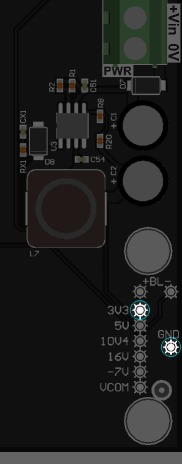
- Press the SAVE button to remember the calibration value. Your HMI700 is now calibrated and you can put your application back.