
Active Templates are a software component technology that provides pre-written program functions that you can incorporate into your SPLat programs. Each template consist of a file that you "run", which gives you a screen to adjust settings. When you have your settings the template automatically generates the correct SPLat code for you.
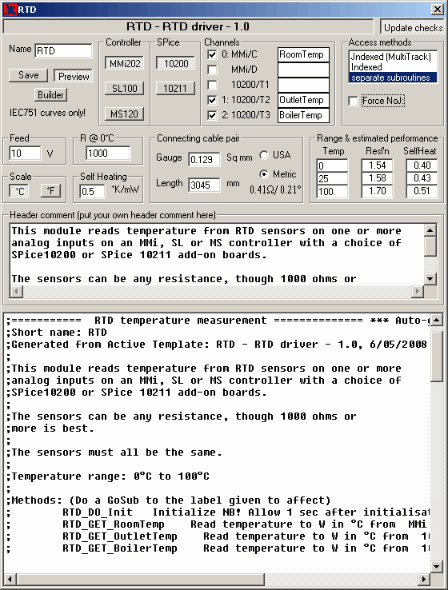
The screen shot on the left shows what one of our Active Templates looks like. You can adjust all the parameters to suit your needs, and the template does all the calculations and generates the SPLat code.
Some Active Templates contain a considerable amount of embedded engineering expertise. For example, the RTD temperature measurement template (shown left) knows about lead resistance, RTD non-linearity and self heating, as well as various configurations of SPLat controllers and SPice add-on boards. It does all the math instantly as you change settings, and warns you if any setting is outside the permissible envelope. It also provides you with an instant estimate of overall performance.
Active Templates can be run from inside the latest version of our SPLat/PC programming software. They can also be run in standalone mode.
Active Templates are far superior to regular code libraries because:
- They provide an interactive configuration screen. You don't have to mess around tailoring constants or code.
- They embody a level of embedded engineering expertise that is missing in libraries. They basically do all the math for you and allow you to explore for optimum solutions. With a conventional library function you will typically need more understanding of the target application (for example how to work out the resistance of a connecting lead) and you will certainly not get warnings of violations or estimates of performance.
- The generated code is way more adaptable than rigid library code.
Active Templates work closely with SPLat Builder. Builder lets you manage your project in a modular fashion. With Builder a project consists of multiple files that are merged together under control of a separate "*.b1d" build file. With builder you don't have to copy and paste the generated code from the template into a .spt file. You simply reference the configured template in your build file, and the system takes care of the rest.
The templates appear as files with the extension .tp1. You just download them and use them.
| File | Latest Rev | Description |
|---|---|---|
| Active Template support package | 1.0 | You need to install this package before you start using Active Templates |
| RTD | 1.0 |
Provides RTD temperature measurement using the thermistor inputs on various controllers with and without SPice10200 and SPice10211 add-ons. The temperature range covered is -200°C to +660°C. While these boards were not designed for RTD (Resistance Temperature Detection) probes, the availability of Pt1000 up to Pt10000 (1K and 10K at 0°C) means you can get useful measurements at temperatures higher than where thermistors will normally operate. Don't expect laboratory accuracy, however. The template has provision for lead resistance and self-heating compensation and a choice of metric or US engineering units. |
| SX10500 driver | 1.0 | The SX10500 is an Xwire peripheral board that supports two K-type thermocouples in the temperature range 0°C to 1024°C with 0.25°C resolution. The driver Active Template takes care of all communication between the host SPLat controller and the SX10500. It gives you a choice of channel counts (1 or 2), °C or °F and noise filtering settings. |